Wolfram Data Repository
Immediate Computable Access to Curated Contributed Data
3D model of rumpled fabric
| "BoundaryMeshRegion" | boundary mesh region representation |
| "BoundingBox" | bounding box |
| "ConnectedComponents" | number of connected components |
| "Graphics3D" | Graphics3D representation |
| "MeshRegion" | mesh region representation |
| "PolygonCount" | number of polygons |
| "Region" | region representation |
| "Summary" | summary information |
| "VertexCount" | number of vertices |
| “Description" | description |
| “LongDescription" | long description |
| “Name" | English name |
| “StandardName" | standard English name |
Retrieve the model:
| In[1]:= | ![ResourceData[\!\(\*
TagBox["\"\<Sample 3D Model: Rumpled Fabric\>\"",
#& ,
BoxID -> "ResourceTag-Sample 3D Model: Rumpled Fabric-Input",
AutoDelete->True]\)]](https://www.wolframcloud.com/obj/resourcesystem/images/7e1/7e1a5a29-ce37-4b2f-a76e-1e9dfd2b9be5/78687dcfadffd4f1.png) |
| Out[1]= | 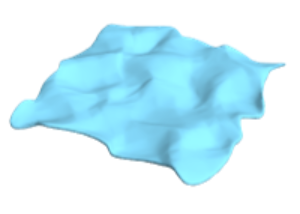 |
Summary properties:
| In[2]:= | ![ResourceData[\!\(\*
TagBox["\"\<Sample 3D Model: Rumpled Fabric\>\"",
#& ,
BoxID -> "ResourceTag-Sample 3D Model: Rumpled Fabric-Input",
AutoDelete->True]\), "Summary"]](https://www.wolframcloud.com/obj/resourcesystem/images/7e1/7e1a5a29-ce37-4b2f-a76e-1e9dfd2b9be5/2406a0a6ada17683.png) |
| Out[2]= | 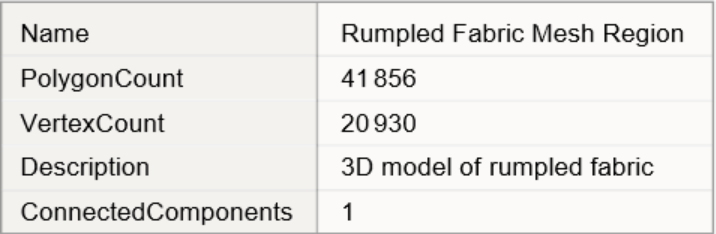 |
Find the minimum-volume ball that encapsulates the mesh:
| In[3]:= | ![bound = BoundingRegion[ResourceData[\!\(\*
TagBox["\"\<Sample 3D Model: Rumpled Fabric\>\"",
#& ,
BoxID -> "ResourceTag-Sample 3D Model: Rumpled Fabric-Input",
AutoDelete->True]\)], "MinBall"]](https://www.wolframcloud.com/obj/resourcesystem/images/7e1/7e1a5a29-ce37-4b2f-a76e-1e9dfd2b9be5/7e70d947b0d13df0.png) |
| Out[3]= |  |
Visualize the mesh together with its bounding ball:
| In[4]:= | ![Show[{ResourceData[\!\(\*
TagBox["\"\<Sample 3D Model: Rumpled Fabric\>\"",
#& ,
BoxID -> "ResourceTag-Sample 3D Model: Rumpled Fabric-Input",
AutoDelete->True]\)], Graphics3D[{Opacity[0.5], bound}]}]](https://www.wolframcloud.com/obj/resourcesystem/images/7e1/7e1a5a29-ce37-4b2f-a76e-1e9dfd2b9be5/567e6d0173672f1c.png) |
| Out[4]= | 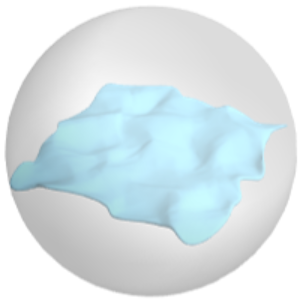 |
Wolfram Research, "Sample 3D Model: Rumpled Fabric" from the Wolfram Data Repository (2026)